
Many people only think about price at first, but the real difference comes down to how much gear you have, where you can place it, and how easy it will be to maintain later on. Both types hold standard 19-inch rack hardware, but they are built for very different environments. Getting this choice right saves you from unsafe mounting, overheating hardware, or running out of rack space within a year. In this article, we walk through practical comparisons, installation realities and what to look for before you place your order.
Core Specification Overview
The table below shows typical ratings for indoor commercial cabinets, suitable for general IT, CCTV and low-voltage networking use. All units follow the EIA-310-D rack standard and carry an IP20 rating for indoor protection.
| Specification | Wall Mounted Cabinet | Floor Standing Cabinet |
|---|---|---|
| Usable rack height | 4U – 15U | 22U – 47U |
| Safe static load | 40–75 kg | 250–700 kg |
| Required floor footprint | 0 m² | 0.45–1.1 m² |
| Standard internal depth | 300–400 mm | 600–800 mm |
| Best matched hardware | PoE switches, patch panels, small NVRs | Core switches, UPS, storage and rack servers |
| Cooling design | Passive ventilation or single top fan unit | Front-to-back airflow, multi-fan trays, blanking panel support |
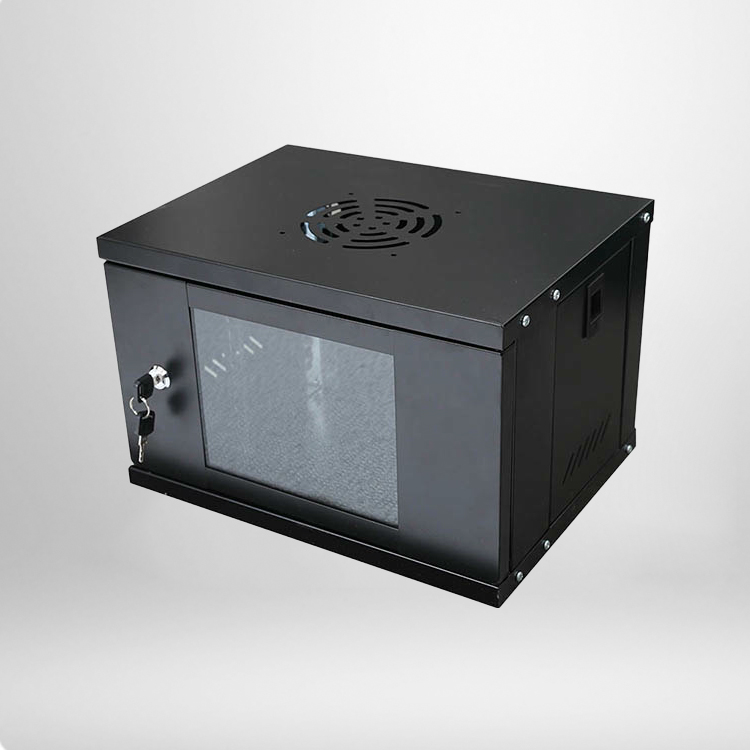
A wall mounted network cabinet is engineered for lightweight, distributed access points. Swing-out variants are popular because technicians can pivot the frame forward and access rear wiring without fully removing the unit from the wall. Floor standing cabinets use thicker welded frames and adjustable leveling feet, so they stay stable even when loaded with heavy power and storage hardware. They are designed to grow with your network over multiple upgrade cycles.
Practical Differences In Daily Use
Installation Requirements And Location Flexibility
The biggest selling point of the wall mounted model is that it does not take up any floor space. It works well in narrow wiring closets, retail back rooms, school communication corners and small remote IDF locations. The catch is the wall itself. Drywall alone cannot carry the full load safely. Anchors must connect into solid concrete or wooden studs, and the total weight of the cabinet plus all devices must stay under the rated limit. If the wall structure is weak, the whole installation becomes a hazard, even if the cabinet frame is well made.
Floor standing cabinets have no wall load restriction, but they need a dedicated flat area. They fit inside server rooms, factory control zones and central equipment areas. They can be arranged side by side and linked with cable pathways, which is ideal when you plan to add more racks over time. The tradeoff is that you need to reserve floor space and keep the area clear for access and airflow.
Equipment Capacity And Long-Term Scalability
Scalability is where these two designs separate sharply. The wall mounted version is intended for fixed, modest setups. It handles a small group of switches and patch panels comfortably, but it is not built for heavy servers or large uninterruptible power supplies. Once you fill the available U space, upgrading usually means adding a second separate cabinet elsewhere.
Floor standing racks support high-density layouts. Their deeper rails fit full-depth servers and larger power units. Because the base carries all the weight, you can keep adding compatible devices as your network expands. For teams that know their network will grow, this often reduces future labour and rework costs.
Thermal Management And Routine Maintenance
Heat is a quiet cause of network instability. A wall mounted network cabinet usually depends on natural air flow through vented doors, sometimes with one small exhaust fan. That works fine for low-wattage switches and passive patch panels. If you pack several high-power PoE devices inside, trapped heat will slowly shorten component life and trigger random dropouts.
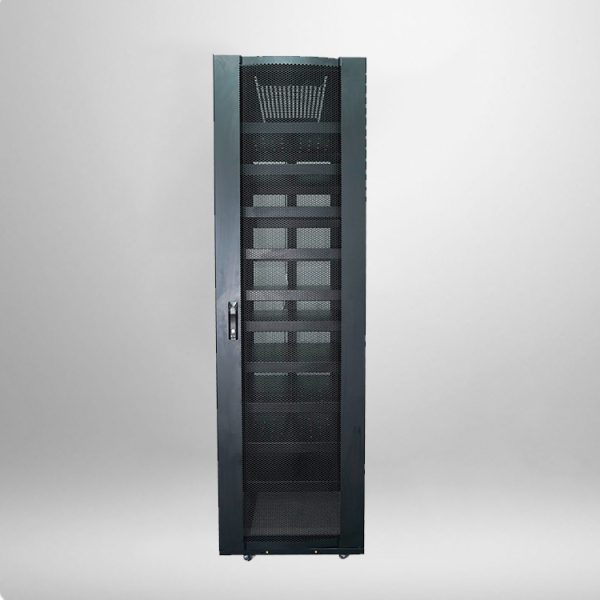
Floor standing cabinets support structured thermal management. Most models come with perforated front and rear doors, removable side panels and dedicated fan trays. Air moves in from the front and exhausts out the rear. There is also more working space behind the rails, so technicians can trace cables, replace modules and test connections without squeezing into tight positions.
Frequently Asked Questions
Can I install a wall mounted cabinet on plasterboard without studs?
It is not recommended. Standard plasterboard anchors are not designed for the combined weight of the cabinet, switches and cables. You should only mount it to studs or solid masonry, and stay below the published load rating.
Does a floor standing cabinet always need a dedicated server room?
No. It can go in any dry, ventilated area with a flat floor. Just leave space around the sides and rear for airflow and cable access. Avoid placing it in damp, dusty or high-temperature locations.
Are both cabinet types compatible with standard 19-inch rack accessories?
Yes. Patch panels, PDUs, blanking panels and standard switches all fit, as long as the internal depth of the cabinet matches your hardware. Depth is often overlooked and can become a frustrating fit issue.
Which option is easier for beginners to set up?
For small hardware loads and a suitable solid wall, the wall mounted cabinet is simpler to place. Floor standing racks are easier to load with heavy gear once positioned, but they take more space and need careful planning for power and cable routing.
Final Guidance For Your Purchase
At the end of the day, the right cabinet comes down to three simple checks: how much equipment you plan to run, whether your wall can support the load, and whether you expect major expansion in the next two or three years. If you only need a tidy access point for a handful of switches and floor space is tight, the wall mounted option is a sensible choice. If you are building a central network hub, running servers or expecting steady growth, the floor standing cabinet offers better stability and room to expand.