
Honest first: a wall network cabinet is not the kind of thing you buy for looks. It sits in a closet, a hallway, or behind a reception desk, and for most of its life nobody gives it a second thought. Until a patch cable keeps popping loose, or the gear inside runs hot in summer, and suddenly you care a lot about how it was built. So before you order one, here are the features that actually decide whether it will still be doing its job a few years from now.
A Frame That Does Not Sag Over Time
The first thing to check is how the box is built. A wall cabinet hangs from a wall, which means its weight sits on the top mounting points, not on the floor. If the steel is thin or the corners are just spot-welded, the whole unit can start to twist once you load it with switches and patch panels. Look for cold-rolled steel in the 1.2 mm to 1.5 mm range, with formed and welded corners rather than stapled seams. It is heavier to lift, but that weight is what keeps the door square and the rack rails straight for years.
A Door That Works With Your Room
The door is the part you touch most, so it deserves more thought than people usually give it. Two choices matter here.
First, glass or solid. A clear glass door lets you see the LEDs and port labels without opening anything, which helps when you are troubleshooting from across the room. A solid steel door blocks light and is easier to keep dust-free, at the cost of visibility. For a closet or a mechanical room, solid is usually fine. For a visible spot like an office, glass tends to earn its way.
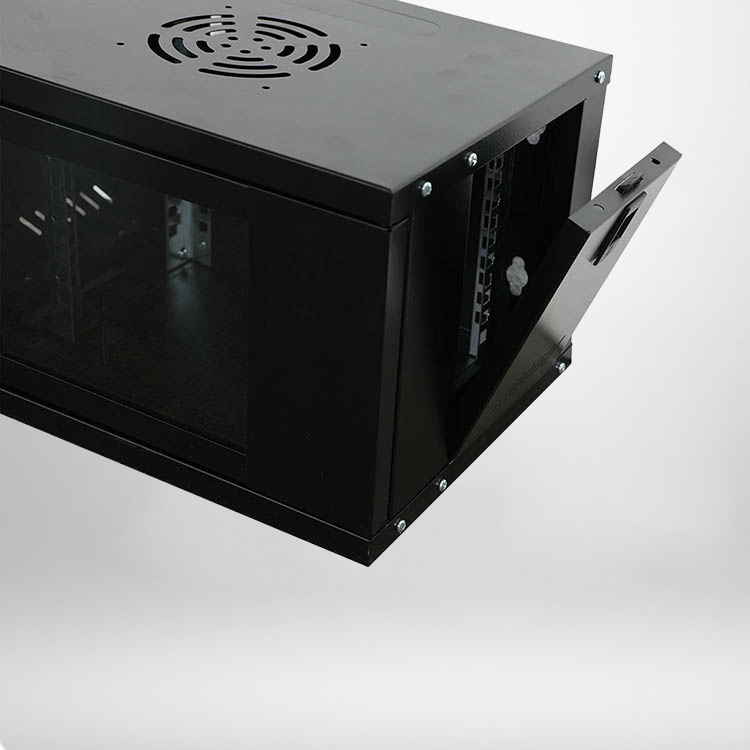
Second, how it opens. A front-hinged door needs clearance to swing open, and in a narrow hallway that can be a real problem. Some cabinets offer sliding or removable doors for tight spaces. Before you mount it, measure the swing path, not just the cabinet itself. Nothing is more frustrating than a cabinet you cannot fully open.
Cooling That Keeps Active Gear Alive
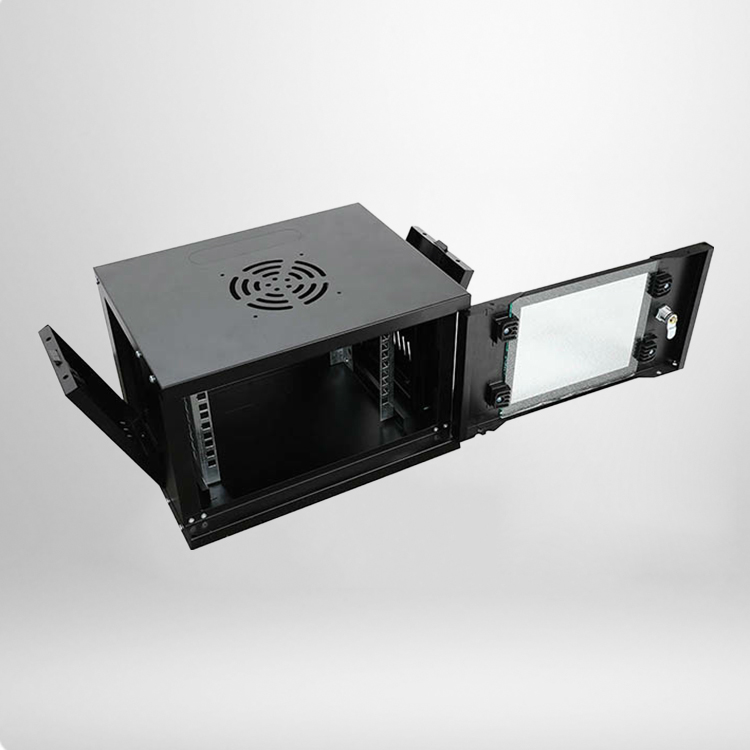
Wall cabinets are small, and small spaces trap heat. A switch that runs warm all day in a closed box will age faster than one with airflow. Check for vent slots top and bottom so heat can rise out, and consider whether the model accepts a fan or vent panel you can add later. If your setup holds powered equipment like switches, routers, or a small server, leave a spare rack unit or two open above the gear so the heat has somewhere to go. Passive ventilation handles most light setups. Add active cooling only when the equipment runs continuously and the space stays warm.
Cable Management That Keeps the Panel Clean
This is where a cheap cabinet and a good one part ways. Look for a row of cable entry holes with grommets, vertical cable managers, and tie-down points inside. A wall cabinet with proper cable routing keeps patch cords short and neat, which makes the next person’s job much easier. Without it, cables pile up against the door, jam the fans, and turn a simple job into a two-hour untangling session every time something changes.
Locking and Access You Actually Use
A lock is not a feature you notice until you wish you had one. If the cabinet sits somewhere public, a keyed lock on the door is worth having so nobody unplugs a switch or snoops at the wiring. Also check how the cabinet opens for service. A swing-out or lift-off design that gives you access from the front is easier to work with than one that forces you to squeeze around the unit. Rear access is a bonus but rarely essential once the cabinet is mounted high.
Mounting Details That Prevent Regrets
The cabinet only works if it stays put. Pay attention to the mounting holes and the hardware that comes with it. Most wall cabinets use a series of slotted holes so you can mark the wall, drill, and hang the unit with a bolt through each slot. Make sure the kit includes decent anchors and bolts, not the thin plastic ones that pull out of drywall under load. Check the depth too. A shallow cabinet is easier to fit against a wall with pipes or conduit behind it, but it also limits how much gear and cable you can pack in. Measure the space before you pick a depth, and remember to leave room for the door to open.
Here is a quick reference for what to compare across models:
| Feature | What It Affects | Typical Range |
|---|---|---|
| Steel Gauge | Structural rigidity and load capacity | 1.0 mm to 1.5 mm cold-rolled |
| Rack Height | How much equipment fits | 6U to 12U for wall units |
| Cabinet Depth | Cable room and wall fit | 300 mm to 600 mm |
| Door Style | Access, visibility, dust control | Glass or solid, hinged or sliding |
| Mounting Pattern | Wall compatibility | Slotted holes, top and bottom |
| Fan/Vent Options | Heat dissipation for active gear | Passive slots, or add-on fan panel |
| Locking | Security in shared spaces | Keyed lock on front door |
How to Match Size to Your Gear
Count the devices you need to install, then add a little slack. If you have a 1U switch and a 1U patch panel, a 6U cabinet gives you room to breathe and a spot for future growth. Cramming gear into a cabinet that is exactly the right size usually means tangled cables and hot spots. Better to buy one size up and leave an empty unit for airflow.
Common Mistakes People Make
The biggest one is mounting the cabinet somewhere unreachable, then realizing the door hits a light fixture or the cables cannot reach the outlet. Another is underestimating weight and trusting drywall anchors on their own. If you are putting a loaded cabinet on plasterboard, anchor into the studs. And do not forget ventilation; a sealed box with active equipment inside is a recipe for an overheated switch.
Frequently Asked Questions
Q: What is a wall network cabinet used for?
It houses network hardware such as switches, patch panels, routers, and small servers, and mounts on a wall to save floor space while keeping cables organized and protected.
Q: How much weight can a wall network cabinet hold?
It depends on the steel gauge and mounting. A typical steel wall cabinet with 1.2 mm to 1.5 mm panels is rated to carry most switch and patch panel loads, but the real limit is often the wall anchors. Always bolt into studs for heavier setups.
Q: Do I need a fan inside the cabinet?
Only if you run powered gear continuously in a warm, enclosed space. For most light installations with one or two switches, passive vents are enough. Add a fan panel when equipment runs hot or the cabinet is fully loaded.
Q: Can I install a wall cabinet myself?
Yes, with a stud finder, a drill, and about an hour. Use the mounting slots to mark the wall, drill into studs, and bolt the cabinet in place. Check the door swing and cable access before you commit to the location.