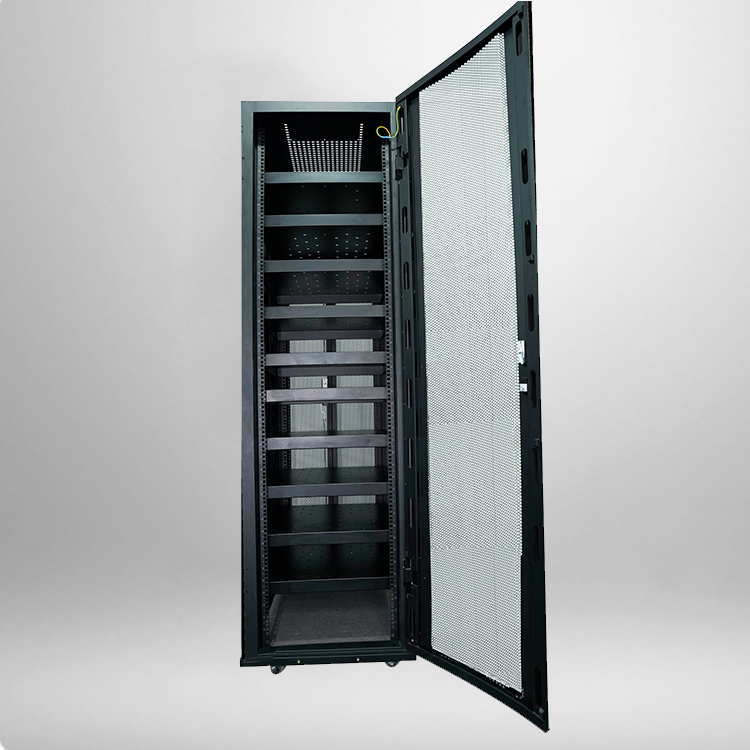
So you just got handed a spec sheet or walked through a server room build-out, and someone dropped the phrase “42U cabinet” on you. If you are staring at an empty metal box wondering what actually goes inside it — you are not alone. I have seen plenty of IT teams order the wrong depth, forget power distribution, or run out of space halfway through deployment because nobody mapped the cabinet beforehand.
Let me walk you through what realistically fits inside a standard 42U network server cabinet, how much space each piece takes, and where people usually mess up.
What Does “42U” Actually Mean?
Before we list equipment, it helps to understand the unit of measurement. “U” (or RU, rack unit) is the standard vertical space measurement in a server rack. One U equals 1.75 inches (44.45 mm) of vertical mounting space.
A 42U rack therefore gives you about 73.5 inches (roughly 2 meters) of usable vertical height. That sounds like a lot until you start stacking 1U servers, 2U switches, and a 3U UPS on top of each other. Space vanishes faster than you would expect.
When people refer to a Network server cabinet 42u, they usually mean a 19-inch wide, floor-standing enclosure with perforated or solid doors, side panels, and integrated mounting rails meeting EIA-310 standards.
The Equipment You Will Typically Rack Mount
Based on what I have seen go into production and edge server rooms, here is the common stack, top to bottom:
Rack Servers
The most obvious occupant. A 1U server takes 1.75 inches of vertical space, but remember — you need airflow gaps, cable clearance, and sometimes a shelf below for heavier units. In practice, you might fit 20 to 30 servers if every unit is 1U and you skip accessories, but that is almost never how a real cabinet looks.
Most enterprises mix 1U compute nodes with 2U storage or GPU-heavy servers. A single 4U or 5U GPU server can eat up nearly a tenth of your rack on its own.
Network Switches and Routers
Core switches, aggregation switches, and edge routers usually live near the top or middle of the cabinet for short cable runs to patch panels. A typical 1U top-of-rack switch consumes one U, but modular chassis switches can be 4U to 7U.
Do not forget that switches need port density — a 48-port 1U switch still pulls a bundle of copper or fiber cables downward. Plan your cable management arms accordingly.
Patch Panels and Cable Management
This is the quiet space hog. A 24-port or 48-port patch panel takes 1U. Horizontal cable managers (the finger ducts you see between rack units) take another 1U each. In a well-organized cabinet, cable management can consume 10 to 15 percent of your total U space.
Skip it, and six months later you are spending an hour tracing a single cable outage.
UPS and Power Distribution
A rack-mounted UPS is commonly 2U to 6U depending on capacity (1kVA to 6kVA). Alongside it, you need a PDU (power distribution unit) — either vertical-mounted along the rear rail or rack-mounted at 1U.
Redundancy matters here. If you have dual power supplies on servers, you need two independent PDUs. Budget that space early because UPS units are heavy and often end up at the bottom of the rack for stability.
Storage and Backup Appliances
NAS units, SAN arrays, tape drives, and backup appliances often take 2U to 5U each. These units are dense in both weight and heat output, so cooling layout becomes critical.
Monitoring, KVM and Accessories
A KVM switch (1U), environmental monitor (1U), rack-mounted monitor/keyboard drawer (1U to 2U), and a fire suppression or temperature sensor module round out the cabinet. These are easy to forget until you need them at 2 a.m.

Typical 42U Cabinet — Key Dimensions and Load Specs
Here is a reference table I keep handy when planning rack layouts. Actual numbers vary by manufacturer, but this gives you a realistic baseline.
| Parameter | Typical Value | Notes |
|---|---|---|
| Usable height | 42U (approx. 2000 mm) | 1U = 44.45 mm |
| Internal width | 19 inches (482.6 mm) | EIA-310 standard |
| External width | 600 mm | Some models 800 mm for cable depth |
| Internal depth | 600 – 1200 mm | Match to deepest server |
| Static load capacity | 800 – 1500 kg | Check before loading heavy UPS |
| Per shelf max load | 50 – 100 kg | For fixed/ventilated shelves |
| Recommended heat load | 3 – 8 kW per cabinet | Above 10 kW needs liquid or in-row cooling |
| Cooling fans | 2 – 4 units top-mounted | 220V, variable speed |
| Material | SPCC cold-rolled steel | Thickness 1.0–1.5 mm frame |
| Protection rating | IP20 (standard) | Sealed models available |
A quick rule of thumb: if your deepest piece of equipment is 900 mm, choose a cabinet with at least 1000–1100 mm internal depth. Otherwise the rear cable arms and door will not close.
Planning the Layout — Where Each Thing Goes
I have seen enough messy racks to know the placement logic matters. The general convention is:
- Top: Cable managers, patch panels, top-of-rack switches — keep cable runs short.
- Middle: Servers and storage — the easiest access zone and best airflow position.
- Bottom: UPS, heavy storage arrays, PDUs — weight down low keeps the cabinet stable.
Leave 1U to 2U of empty space every few rack units for airflow. Hot aisle / cold aisle design relies on those gaps. A fully packed rack with no ventilation gaps will trigger thermal alarms within hours.
FAQ
How much equipment can a 42U cabinet actually hold? A 42U rack provides 42 rack units of vertical space. In a real-world production environment, after accounting for cable management (about 5–7U), UPS (2–6U), PDUs (1U), and network gear (2–4U), you typically have around 28 to 34U left for servers and storage. That translates to roughly 20 to 30 x 1U servers, depending on mix.
What depth should I choose for a Network server cabinet 42u? Depth depends on your deepest server. Common depths are 600 mm, 800 mm, 1000 mm, and 1200 mm. For standard rack servers, 800–1000 mm works. If you plan to use GPU servers or deep storage arrays, go with 1100–1200 mm to leave room for rear cabling.
How much cooling does a full 42U cabinet need? A moderately loaded 42U cabinet generates 3–6 kW of heat. If you are running dense compute or GPU workloads, expect 8–15 kW. At that point, standard room air conditioning is usually not enough — you will need in-row coolers, rear-door heat exchangers, or hot-aisle containment.
Can I install non-rack equipment inside a 42U cabinet? Yes, with fixed or ventilated shelves. Shelves come in 1U, 2U, or 3U heights and support 50–100 kg per shelf. Just make sure the shelf depth matches the cabinet depth and that you are not blocking airflow to rack-mounted units above and below.
Does a 42U cabinet need leveling feet or casters? Most cabinets ship with both. Casters let you move the empty cabinet into position, then leveling feet take the load once the rack is populated. Once loaded with servers and UPS, never roll the cabinet — the weight shifts dangerously.